
|
Classic Sonic's physics are pretty Good and they feel Great to play. The attenuation on slopes is Awesome and Outstanding, in fact. Possibly, even Amazing. 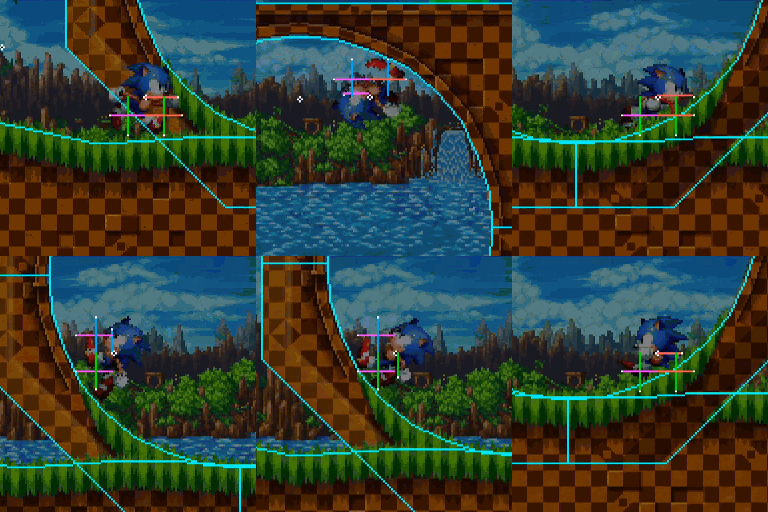 Sonic Studio is a celebration of this momentum-based 2D Sonic, and in order live up to this I aim for a high degree of accuracy to the original Sonic games on the Sega Genesis/Mega Drive. The Physics should feel the same, object behaviour should feel the same, and everything else should function as expected. However, there are some differences in Sonic Studio. Some deliberate improvements, but also some incidental changes... Slope Physics (360 Degree Movement) We all know Sonic can not only walk on floors, but can also run up walls, and even on ceilings - this is all part of what made these original Sonic games unique! "Normal" platformer engines that feature slopes can align a player up and down with the slope below them, but walls are... just walls, things to bump into. But Sonic can walk on them! How? Since most of you don't obsess over classic Sonic mechanics, so I'm going to quickly explain how Sonic walks on walls in the original games (skip ahead if you already know this).
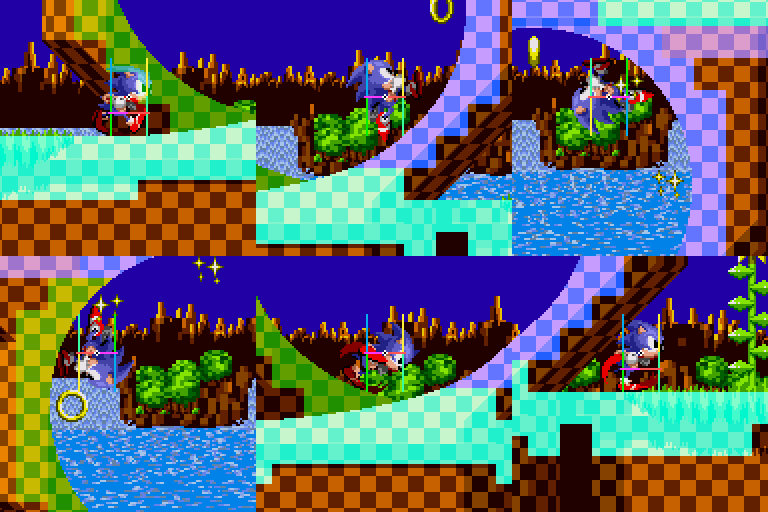
So, with that explained: When Sonic's Mode switches, it can cause a shift in Sonic's position, popping outwards from the slope slightly. 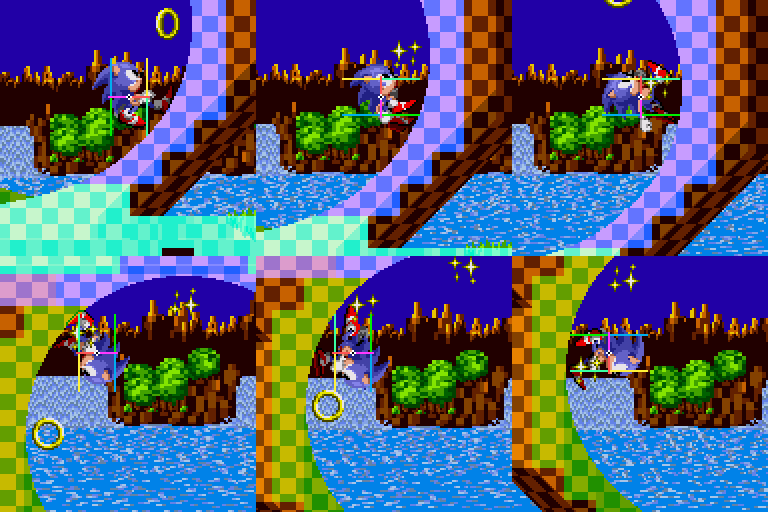 The popping observed here in Sonic 1 applies to each of the original games. The reason for this is when his Angle is greater than 45 degrees, it's actually a bit too late to switch seamlessly. Even Sonic Mania has this popping, though to a lesser degree. In Sonic Studio I wanted to be sure to remove this problem, and not just for appearance. Because you can create all sorts of terrain shapes which all need to be smoothly traversable as you expect, the Mode switching is an incredibly integral mechanic and needs to happen at the appropriate time in all cases. So, in Sonic Studio, the mechanic for switching Sonic's Mode is brand new. Rather than using Sonic's current angle to switch his Mode, it instead performs extra checks for slopes where Sonic's feet would be if his Mode were already changed. If a slope is found, his Mode is updated. Thanks to @MercurySilver for suggesting this idea a long, long time ago. Here, you can see extra terrain sensors across Sonic's feet facing forward and back, which check for steep enough slopes both in front and behind. Using this system, the result is a totally smooth transition every time. Of course, these new checks need to ignore slopes that are steep enough to be walls you'd push against, but with that taken care of, it doesn't get much smoother than this. Slope Physics (Terrain & Angles) There are also more subtle differences to mention regarding slope physics accuracy. The original games use height mask tiles for terrain collision, while Sonic Studio uses vector lines. This causes slight differences even if you were to try and recreate the slopes perfectly. Most notably, in the original games, the angles are pre-calculated for each tile (and aren't always accurate). In Studio, angles are based directly on the angle of the line. The result of this is that, over time, similar slopes in both the original games and Sonic Studio would move Sonic, and apply physics, slightly differently. The underlying logic that reacts to these angles and slopes is the same, however. Object Collision For everything perfect about collision with sloped terrain in the original Sonic games, there's something imperfect with object collision. Ok it's not too bad, but there are some notable issues. Firstly, if you don't land perfectly above an object, you'll slip off... even if you would be able to stand there. 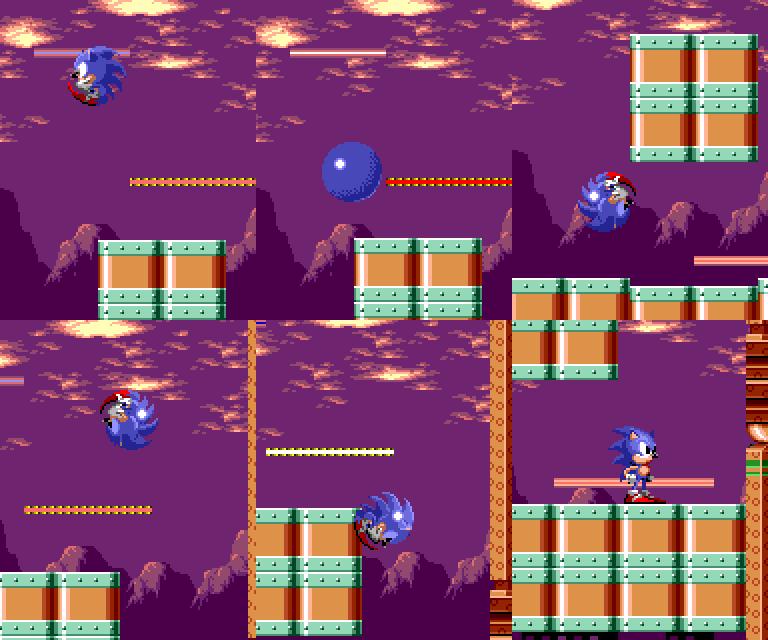 Platforms have the same issue, but also when you are already standing/walking on them - you'll fall off far too soon. This is not the case with fully solid objects. 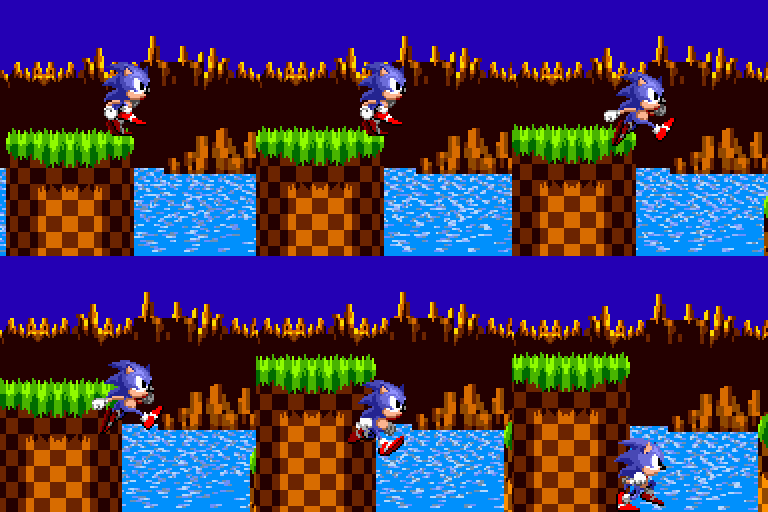 Finally (a small one), pushing objects and pushing terrain behave differently. 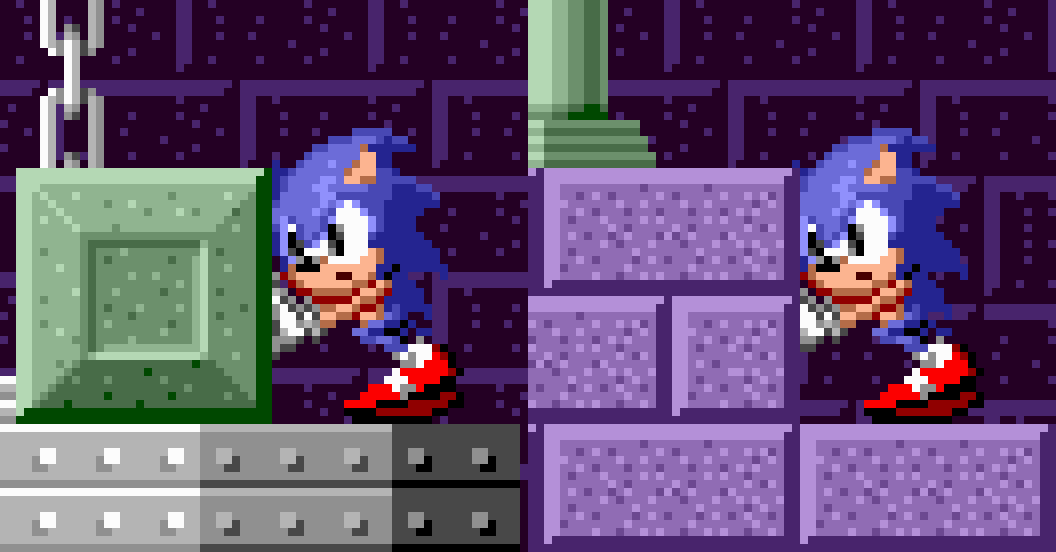 While the object pushing looks more correct here, the object is actually a pixel too big. While solid object collision is recreated with the same method used in these games, all of these issues and more have been addressed and fixed in Sonic Studio.
Object Interaction You may not have considered this before, but objects in the original games don't interact with each other (Unless they are specifically required to, like the puzzle block in Marble zone). Badniks will pass right through Spikes and Springs, lost Rings will fall right through platforms, and objects can't land/walk on Bridges. This is because those objects are only Player-seeking when checking for collisions. However, in Sonic Studio every object is aware of every other and (in most cases) all will react to each other. I want Sonic Studio to be open to many possibilities when designing stages, and if objects could not interact... those possibilities would be rather limited. This kind of global interaction required a brand new system created specifically for Sonic Studio, which allows for things like Bridges, Seesaws and Flippers to consider each object that may be on top of them and react accordingly. It also allows for things like the Bombs from Star Light zone to destroy other objects such as Breakable Blocks. That's just a couple of the reactions and interaction possibilities this system opens up. Not only that, all objects react to the water! You will see more about this aspect of the game in the near future. That's all, good bye! Hope you enjoyed getting a peek behind the curtains at these weird cases and small bugs that had to be addressed in order to make Studio what it needs to be. These are just some of the many things being considered. There are a lot more differences under the hood which would take far too much explaining for this blog - but rest assured, the experience will be accurate, smooth, and very classic.
8 Comments
Squidward578
10/5/2023 02:55:23 am
I think he was planning to do spin dash, drop dash, and peelout Impressive work, and a great writeup! In some of my own experiments in recreating Sonic physics many years ago, I struggled to create collision data for tiles without building additional extensive editing tools to go with my tiles. The vector approach is much cleaner - I understand that most shapes in Sonic Studio are polygons, but did you ever have a phase where the vectors were associated with tiles?
Lapper
10/4/2023 06:14:08 pm
It's been fully shape based from the beginning! There was never a tile system in Studio at any time.
Lapper
24/4/2023 02:08:04 pm
Wall sensors move themselves with the player, as they are cast before Sonic actually moves. However, this also means they can't perfectly predict his next position so they will appear to shift a little.
Anonymous
5/5/2023 08:32:35 pm
Does the optimized slope-check system make it easier for sonic to stay on curved terrain (such as small, elipse-like shapes) at high speeds?
Lapper
25/7/2023 01:06:41 pm
Yes! It uses physical geometry ahead of time rather than ground angle after the fact, it's definitely more effective. However, even more must be done to allow insane speeds unseen in the original games. Your comment will be posted after it is approved.
Leave a Reply. |
AuthorHi, I'm Lewis. I'm a 2D game artist, animator, illustrator, video editor, and game developer.
@LapperDev Archives
July 2023
Categories
All
|
 RSS Feed
